A Developer's Guide to github-readme-stats

A Developer's Guide to github-readme-stats

anuraghazra/github-readme-stats

2025-08-27

As a software engineer, you spend a lot of time on GitHub. This tool lets you show off your work directly on your profile or repository README. It's useful for a few reasons

Quick Visuals
Instead of manually listing your stats, you get a clean, automatically updated card that displays your contributions, top languages, and more.

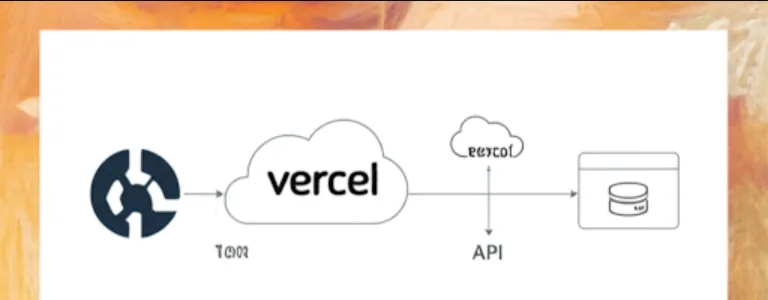
Serverless & Dynamic
It uses a serverless function, so you don’t need to host or maintain anything. The stats are generated dynamically, meaning they're always up-to-date with your latest activity.

Flexibility
You can customize the look and feel to match your personal brand or project's theme. This includes colors, themes, and what information is displayed.

Portfolio Enhancement
It makes your GitHub profile more engaging and professional, which can be a big plus when recruiters or other developers view your page.

Getting this set up is super easy. You don't need to be a DevOps wizard or anything; it’s just a simple URL you add to your README.

Go to the README.md file of your profile or repository and add an image tag. This is the simplest way to get a basic stats card.
![Your GitHub Stats](https://github-readme-stats.vercel.app/api?username=YOUR_USERNAME)

Important
Make sure to replace YOUR_USERNAME with your actual GitHub username.

Save the changes to your README.md file and push them to your GitHub repository. The stats card will automatically appear, showing your contributions.

The real power of this tool comes from its customization options. You can add URL parameters to the image URL to change its appearance and content.

ParameterDescriptionExample
username(Required) Your GitHub username.username=octocat
show_iconsShows icons next to the labels. Set to true.show_icons=true
themeChanges the color theme of the card.theme=dark
hide_rankHides the contribution rank. Set to true.hide_rank=true
title_colorSets the color of the card's title. Use a hex code.title_color=0f969c
hideA comma-separated list of stats to hide.hide=contribs,prs
count_privateIncludes private contributions in the count. Set to true.count_private=true

You can combine these parameters using & in the URL.

Here's a more complete example with some customization. This shows how you can create a stats card and a top languages card.

This URL generates a stats card with a custom theme, icons, and a custom background.

### My GitHub Stats

![My GitHub Stats](https://github-readme-stats.vercel.app/api?username=YOUR_USERNAME&show_icons=true&theme=onedark&bg_color=191924)

This URL creates a separate card that shows your most-used languages. It's a great way to highlight your polyglot skills.

### My Top Languages

![Top Languages](https://github-readme-stats.vercel.app/api/top-langs/?username=YOUR_USERNAME&layout=compact&langs_count=6)

anuraghazra/github-readme-stats


Stremio Add-on Creation 101: A Node.js Sample for Software Engineers

Let's dive into how this project can be useful, how you might integrate with it, and some conceptual examples.Stremio is an application designed to aggregate various streaming sources (like movies


Extending Your Media Server: A Developer's Look at Jellyfin's Backend

I'd be happy to explain how Jellyfin, a free software media system, can be incredibly useful from a software engineer's perspective


From Code to Components: Integrating with InvenTree as a Developer

Let's dive into InvenTree from a software engineer's perspective. It's a fantastic open-source inventory management system


Accelerating Generative AI Development: Integrating the HuggingChat Open-Source Front-end

Here's a friendly and detailed breakdown of how this open-source codebase can benefit you, along with guidance on adoption and a conceptual code example


Code Consistency & Speed: Customizing Your Code Assistant with Community Prompts

Here is a friendly and clear breakdown of how this resource is useful, how to get started, and some examples.From a software engineer's perspective


Beyond Containers: An Introduction to Firecracker MicroVMs

Imagine you're building a serverless platform, or you just need to run some code in a very isolated, very fast way. You could use containers


Automating Secret Syncs from AWS Secrets Manager to Kubernetes

Basically, External Secrets Operator is a tool that helps you manage secrets in Kubernetes without having to store them directly in your cluster


Beyond Keywords: The HyDE Approach to Semantic Information Retrieval

First, let's clarify that the repository you mentioned, HyDE-Project/HyDE, seems to be associated with a different concept than a typical "Development Environment


Glow: The Essential CLI Tool for Reading and Managing Technical Markdown

glow is a Command Line Interface (CLI) tool that renders Markdown files directly in your terminal. As a software engineer


Level Up Your CSS: A Deep Dive into The Odin Project's Exercises

"TheOdinProject/css-exercises" is a collection of hands-on CSS tasks designed to complement the HTML and CSS curriculum provided by The Odin Project (TOP). Think of it as your personal gym for practicing and mastering CSS concepts